vLLM vs SGLang: A Practical Comparison of Two LLM Inference Servers
Hi!
vLLM and SGLang are the two main open-source servers for running language models on your own GPUs. They do the same job, have the same API and similar speed. They differ in memory handling, configuration, security and monitoring.
Each section of the article starts with the common part, then a subsection on vLLM and a subsection on SGLang. Versions: vLLM 0.34.0 of 16 November 2026 and SGLang 0.5.23 of 2 November 2026. Commands, config files and output are taken from a working test bench; what is retold from the documentation without being run is marked.
The main points:
- A single request is handled at the same speed by both. The difference appears under load and depends on the model.
- Memory: vLLM allocates it by itself, in SGLang you set the share.
- The conversation cache is more precise in SGLang: it saves more on long conversations and agents.
- Security: neither should be exposed to the internet without a proxy.
- vLLM is the default choice, SGLang is for agents and large clusters. The selection scheme is at the end.
How inference engines work inside is covered in a separate article. Four concepts from it are needed here: tokens, the prefill and decode phases, the KV cache and batching. TTFT is the time to the first token of the answer.
What vLLM and SGLang are
An inference server keeps the model in GPU memory, accepts requests over HTTP in the OpenAI format and handles many requests at once. The path of a request:
vLLM: who builds it
- Repository: about 97 thousand stars, Apache 2.0 license, a new version every two weeks.
- Appeared in 2023 in Berkeley. Since 2025 it has been a PyTorch Foundation project. Since January 2026 it is backed by the company Inferact (150 million dollars of investment).
- Who uses it: LinkedIn (more than 50 products), Red Hat (the basis of its products for OpenShift), AWS (SageMaker and Bedrock), NVIDIA (the NIM 2 containers contain vLLM or SGLang).
SGLang: who builds it
- Repository: about 39 thousand stars, Apache 2.0 license, a new version every two weeks.
- Appeared in 2024. Led by the non-profit LMSYS, the authors of the Chatbot Arena leaderboard. Since 2026 it is backed by the company RadixArk (100 million dollars of investment).
- Who uses it: xAI (the Grok-2 model card tells you to run the model through SGLang), Meta (according to its talk in November 2026), Cloudflare (Workers AI), LinkedIn (search ranking; LinkedIn uses both servers).
How they differ from other ways to run a model
vLLM and SGLang are built for many simultaneous requests on your own GPUs. For a single user they are no faster than simple programs.
| Option | What for | Difference from vLLM and SGLang |
|---|---|---|
| llama.cpp, Ollama, LM Studio | a model on your own computer | works even without a GPU, compressed GGUF models, starts in seconds; weaker under load from many users |
| TensorRT-LLM | maximum speed on NVIDIA | NVIDIA only, fewer models |
| NVIDIA NIM | a ready container with paid support | not an engine: vLLM or SGLang inside |
| TGI from Hugging Face | the former main rival | archived, its authors recommend vLLM and SGLang |
| Dynamo, llm-d, AIBrix | dozens of GPUs in Kubernetes | a layer above the engines: spreads requests across copies of vLLM or SGLang |
| LiteLLM | one address for different models, keys, budgets | a gateway in front of the servers, does not run models |
| Cloud API | pay per token | nothing to maintain; your own GPU pays off only under constant load |
More in the map of engines.
vLLM: its place among other systems
The default choice. The widest list of models and hardware. The Kubernetes layers (llm-d, AIBrix, KServe), Ray Serve and Red Hat products support it first. In the MLPerf tests in April 2026, 20 participants ran on it (Red Hat's count).
SGLang: its place among other systems
Stronger on requests with a shared beginning: agents, long conversations, one system prompt for many users. Often ahead on very large models on dozens of GPUs. The same cluster layers support it, but usually later than vLLM.
Test bench
- RTX 5070 Ti Laptop GPU, 12 GB; Ryzen 9 9955HX; 64 GB of RAM.
- Windows 11, WSL2, Docker Desktop.
- Images
vllm/vllm-openai:v0.34.0andlmsysorg/sglang:v0.5.23-runtime. - Prometheus 3.16, Grafana 13.3, Jaeger 2.23, nginx 1.30 — in the same Docker network.
The models are the Qwen3.5 family: they understand images, reason before answering, call functions, Apache 2.0 license.
| Model | Weights | On 12 GB |
|---|---|---|
| Qwen3.5-4B, FP8 | 7.5 GiB | the main model of the article |
| Qwen3.5-2B | 4.3 GiB | measurements under load |
| Qwen3.5-0.8B | 1.7 GiB | two copies at once, for routing |
| Qwen3.5-4B uncompressed | 8.7 GiB | does not start |
| Qwen3.5-9B, 4-bit | 8.5 GiB | does not start |
Absolute speeds on a laptop are several times lower than on servers. The settings, the errors and the content of the logs on big hardware are the same.
Hardware and systems
Both servers need Linux, an accelerator with enough memory and fresh drivers.
vLLM: hardware and systems
- OS: Linux only. Windows through WSL2 or Docker, Mac through the vllm-metal plugin.
- Python: 3.11–3.14.
- NVIDIA: from the T4 and RTX 20xx. Builds for CUDA 13 only. For old drivers —
VLLM_ENABLE_CUDA_COMPATIBILITY=1. - AMD: Instinct MI200, MI300, MI350, Radeon RX 7900 and RX 9000 (ROCm).
- Intel: Arc and server accelerators.
- Through plugins: Google TPU, AWS Trainium, Huawei Ascend, Apple Silicon.
- Without a GPU: works, for small models.
SGLang: hardware and systems
- OS: Linux. Windows is not mentioned in the documentation; it works in Docker on top of WSL2.
- Python: 3.11 and newer. On 3.10 the installation does not fail but installs an old version of the server.
- NVIDIA: from the A100 to the newest server GPUs, RTX 30, 40 and 50, DGX Spark, Jetson. CUDA 13 only.
- AMD: Instinct MI300X, MI325X, MI350X, MI355X.
- Intel: Arc and Xeon.
- Other: Google TPU, Huawei Ascend, Apple Silicon, Moore Threads.
- RTX 50 and installation through pip: no model starts without manually setting the paths to the CUDA compiler (open issue). The Docker image does not have this problem.
Installation
Two ways: a Python package or a Docker image. In production take an image with a version number, not latest: both programs are released every two weeks and regularly change their flags.
Models are downloaded from Hugging Face on the first launch into ~/.cache/huggingface. This folder is mounted into the container so as not to download again.
vLLM: installation
uv pip install vllm --torch-backend=autovllm download-kernelsThe second command downloads ready-made kernels for the GPU. Without it the server compiles them on the first launch, which takes several minutes. Run it after every installation and update.
docker pull vllm/vllm-openai:v0.34.0The image: 10 GB to download, 36 GB on disk.
SGLang: installation
uv pip install --prerelease=allow sglangWithout --prerelease=allow old versions of uv silently install SGLang 0.5.9.
docker pull lmsysorg/sglang:v0.5.23-runtimeThe -runtime image is lightweight: 14.5 GB to download, 50 GB on disk. The full one, v0.5.23, also contains build tools.
First launch
The server starts with one command. vLLM listens on port 8000, SGLang on 30000. The requests to them are the same.
vLLM: first launch
docker run --gpus all --ipc=host -p 8000:8000 \ -v ~/.cache/huggingface:/root/.cache/huggingface \ -v vllm-cache:/root/.cache/vllm \ vllm/vllm-openai:v0.34.0 \ RedHatAI/Qwen3.5-4B-FP8-dynamic \ --max-model-len 16384 --max-num-seqs 16--ipc=host— the server's processes exchange data through shared memory.- The
vllm-cachevolume stores what was compiled on the first launch. - Ready when you see the line
Application startup complete. On the test bench, after 155 seconds.
What the server writes about memory:
Model loading took 6.23 GiB memory and 11.814035 secondsAvailable KV cache memory: 3.99 GiBGraph capturing finished in 1 secs, took 0.14 GiBGPU KV cache size: 34,492 tokens, Maximum concurrency for 16,384 tokens per request: 2.11xThe conversation memory holds 34,492 tokens — two conversations of maximum length.
The request:
curl http://localhost:8000/v1/chat/completions \ -H "Content-Type: application/json" \ -d '{ "model": "RedHatAI/Qwen3.5-4B-FP8-dynamic", "messages": [{"role": "user", "content": "What is a KV cache in LLM inference? Answer in two sentences."}], "max_tokens": 400 }'The content field will contain the model's reasoning, not the answer:
Thinking Process:
1.  **Analyze the Request:**    *   Topic: KV cache in Large Language Model (LLM) inference.    *   Constraint: Answer in exactly two sentences....
The server does not know where the model's reasoning ends until the --reasoning-parser flag is set (the configuration section).
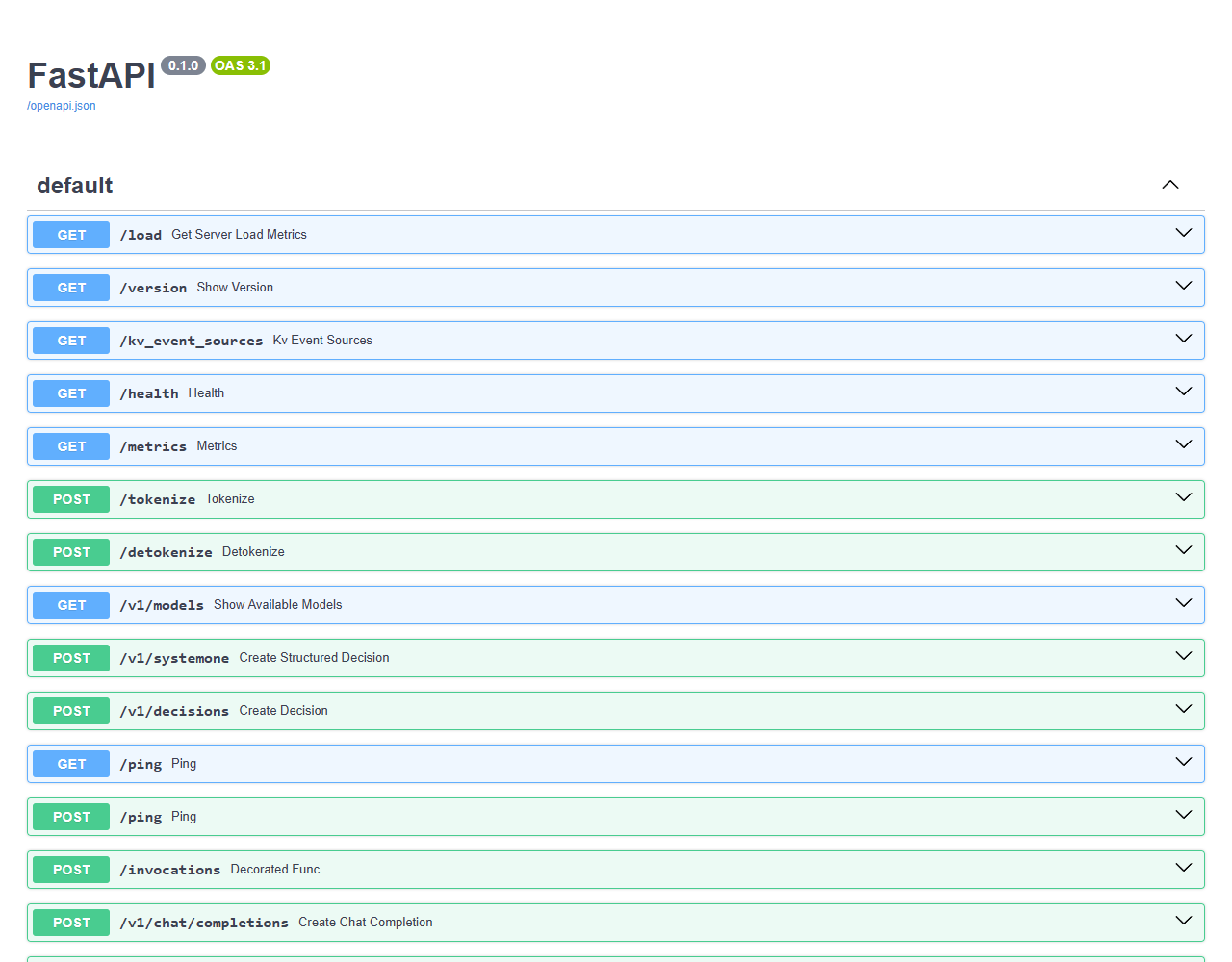
The list of all API addresses is on the page http://localhost:8000/docs, with 24 operations:
SGLang: first launch
docker run --gpus all --ipc=host --shm-size 16g -p 30000:30000 \ -v ~/.cache/huggingface:/root/.cache/huggingface \ lmsysorg/sglang:v0.5.23-runtime \ sglang serve RedHatAI/Qwen3.5-4B-FP8-dynamic \ --host 0.0.0.0 --port 30000 \ --context-length 16384 --mem-fraction-static 0.8--host 0.0.0.0is required in a container. By default the server listens on127.0.0.1: the log says "ready", but requests from outside do not get through.- Ready when you see the line
The server is fired up and ready to roll!. On the test bench, after 85–100 seconds.
What the server writes about memory:
Load weight end. elapsed=2.19 s, quant=compressed-tensors, avail mem=4.44 GB, mem usage=6.28 GB.Mamba Cache is allocated. max_mamba_cache_size: 20, conv_state size: 0.02GB, ssm_state size: 0.98GBKV Cache is allocated. #tokens: 38949, K size: 0.59 GB, V size: 0.59 GBmax_total_num_tokens=38949, max_running_requests=4, context_len=16384, available_gpu_mem=0.37 GBThe conversation memory is 38,949 tokens, no more than four simultaneous requests.
The request and the answer are the same as in vLLM, only the port changes. The reasoning also lands in content until --reasoning-parser is set.
On the /docs page SGLang has 108 operations:
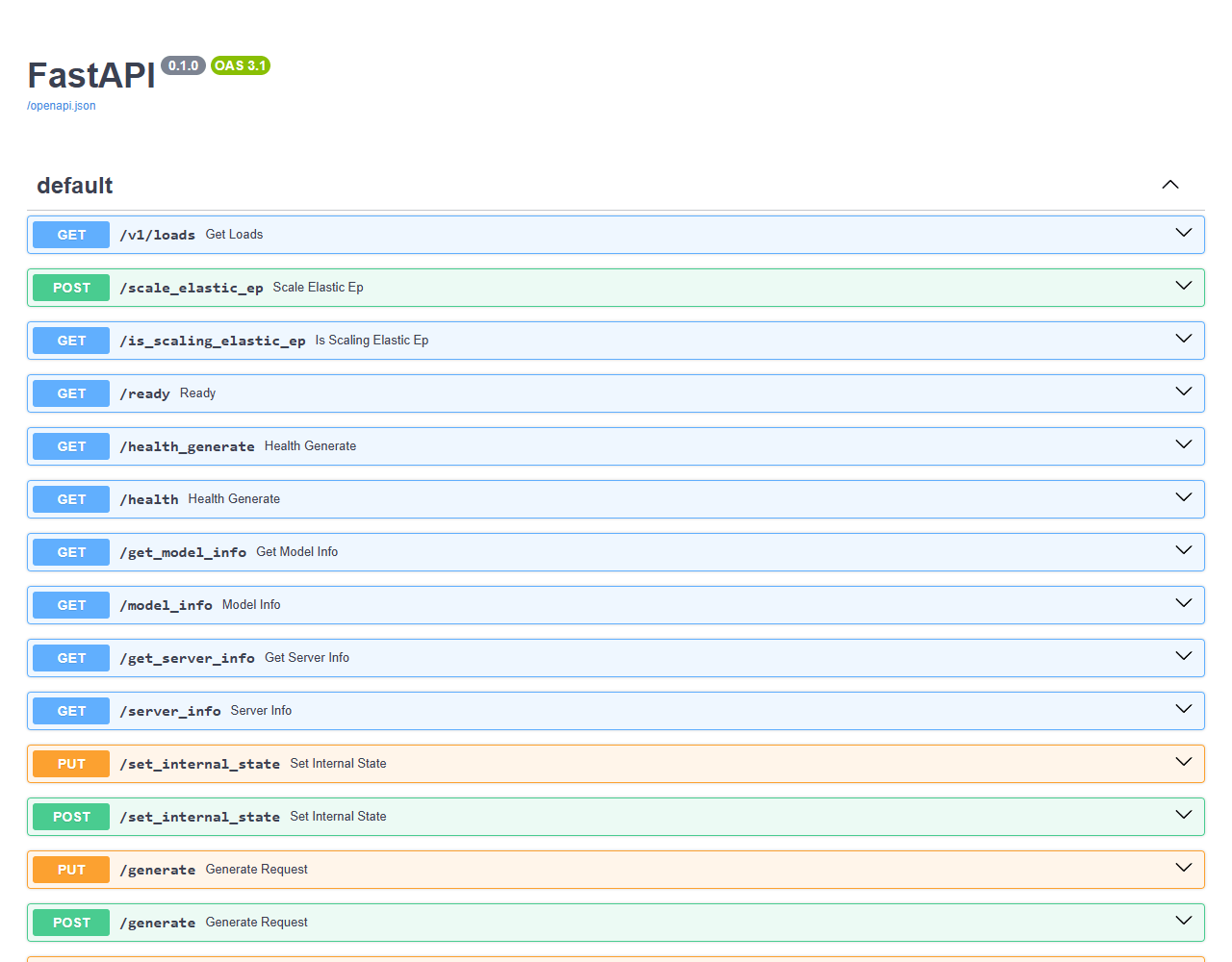
Besides the API for clients there is server management here: cache reset, weight updates, adapter loading, profiling. All of this must be closed off from outsiders (the network section).
GPU memory
GPU memory decides whether a model starts, how many conversations fit at once and how long they can be. The memory is divided like this:
- Model weights. The size equals the size of the model files and does not change.
- Conversation memory (KV cache). For Qwen3.5-4B it is 32 KiB per token: a conversation of 16 thousand tokens takes 512 MiB. It grows with the number of users.
- State of hybrid models. Qwen3.5 has ordinary attention in only 8 layers out of 32. The other 24 store a compressed state of constant size for a conversation. In the logs it is called the Mamba cache.
- Working buffers for the computation of one step. On the test bench — about 1.6 GiB.
- Recorded computation graphs (CUDA graphs): 0.1–0.5 GiB.
- Other programs. On a laptop the desktop and the browser take 1.2 GiB, on a dedicated server — nothing.
The same model in two servers:
The order in which the servers divide memory at startup is different:
What follows from this:
- Besides the weights, another 3–4 GiB is needed. A model whose files are almost as large as the GPU memory will not start.
- Conversation memory is what is left after the weights, buffers and graphs.
- There are three knobs: conversation length, number of simultaneous requests, the share of memory for the server.
vLLM: GPU memory
Before version 0.34 the server grabbed 92% of GPU memory in advance. Since 0.34 it loads the weights, runs trial requests, measures the buffers and graphs and gives everything that is left to conversation memory. It is now better not to set the --gpu-memory-utilization flag: any value will only reduce the conversation memory. The old advice "it does not start — lower --gpu-memory-utilization" is out of date.
Actual usage is 6.33 GiB for consumed memory (weights + non-torch), 1.59 GiB for peak activation, and 0.14 GiB for CUDAGraph memory.Memory after warmup: 4.17 GiB free, 1.59 GiB kept for transient activations; 80 KV cache blocks (1.41 GiB) fit within the requested 11.91 GiB.| Flag | What it does |
|---|---|
--max-model-len | maximum conversation length in tokens. By default taken from the model: for Qwen3.5 it is 262,144 |
--max-num-seqs | number of simultaneous requests. 256 by default, 1024 on large server cards |
--gpu-memory-utilization | share of GPU memory for the server. Needed when several programs share the card |
--kv-cache-memory-bytes | exact size of the conversation memory |
--kv-cache-dtype fp8 | compressed conversation memory: twice as many conversations |
When the conversation memory runs out, new requests wait in the queue. If it is not enough for those already started, the server preempts the most recently accepted request and later reads its prompt again. The user sees a delay, not an error.
Two copies of the server on one GPU: give each --gpu-memory-utilization 0.4, otherwise the first will take everything.
SGLang: GPU memory
The --mem-fraction-static flag sets the share of GPU memory for the weights and conversation memory together. The rest goes to buffers and graphs. Without the flag the server calculates the share itself; on a card with 12 GB it came out to 0.63.
How to choose it, according to the documentation:
- at startup the server writes the amount of free memory left —
available_gpu_mem; - on large cards 5–8 GB left over is normal;
- much more left over — the share can be raised;
- the server crashes from lack of memory under load — the share needs to be lowered.
On 12 GB the default value is too cautious. Qwen3.5-4B in FP8 does not start with it:
RuntimeError: Hybrid (mamba/linear-attention) state cache is too small to serve any requests. max_mamba_cache_size=3, mamba_ratio=5, resulting max_num_reqs=0. Try: (1) reduce --max-running-requests, (2) increase --mem-fraction-static, or (3) use GPUs with more memory.With --mem-fraction-static 0.8 it starts: four simultaneous requests.
| Flag | What it does |
|---|---|
--mem-fraction-static | share of GPU memory for the weights and conversation memory |
--context-length | maximum conversation length in tokens |
--max-running-requests | number of simultaneous requests |
--max-total-tokens | exact size of the conversation memory in tokens |
--chunked-prefill-size | size of the chunks a long prompt is read in. Smaller — smaller buffers |
--kv-cache-dtype fp8_e4m3 | compressed conversation memory. For accuracy a scales file is needed: --quantization-param-path |
--mamba-full-memory-ratio, --max-mamba-cache-size | memory for the state of hybrid models |
When the conversation memory runs out, SGLang takes one of the running requests off and returns it to the queue. In the log: KV cache pool is full. Retract requests. If this happens often, raise --schedule-conservativeness.
What does not fit into 12 GB
| Model | Weights in memory | vLLM | SGLang |
|---|---|---|---|
| Qwen3.5-4B uncompressed | 8.6 GiB | no room for conversation memory | 2.57 GB short for the state |
| Qwen3.5-9B, 4-bit | 8.4–9.5 GiB | the same | the same |
Compression to 4 bits shrinks only the main layers. The image-processing block and the token tables stay as they were, so a model with 9.7 billion parameters takes more than 8 GiB.
The vLLM failure:
Memory after warmup: 0.91 GiB free, 1.59 GiB kept for transient activations; 0 KV cache blocks (0.0 GiB) fit within the requested 11.91 GiB.ValueError: No available memory for the cache blocks. [...] decrease `max_model_len` or `max_num_seqs`, or the model needs a device with more memory.The SGLang failure:
Load weight end. avail mem=1.37 GB, mem usage=9.35 GB.RuntimeError: Not enough GPU memory for hybrid (mamba/linear-attention) state cache. Computed max_mamba_cache_size=-27 (total_rest_memory=-2.57 GB, mamba_cache_per_req=49.12 MB).vLLM reports the lack of memory after 2–4 minutes, at the end of the warmup. SGLang — after 20–30 seconds, right after the weights are loaded.
With a hybrid model vLLM can also give one more error at startup: the default --max-num-seqs value is too large.
ValueError: max_num_seqs (256) exceeds available Mamba cache blocks (42). Please lower max_num_seqs to at most 42 or increase gpu_memory_utilization.Model formats and quantization
Both servers work with the safetensors format from Hugging Face. GGUF, familiar from llama.cpp and Ollama, is not their format. What quantization is — in the section on it.
Both servers recognize a model compressed in advance by themselves, without flags.
vLLM: formats and quantization
- Sources: Hugging Face, a folder on disk, ModelScope (
VLLM_USE_MODELSCOPE=True), object storage (vllm serve s3://bucket/model --load-format runai_streamer). - Ready-made compressed models: FP8, AWQ, GPTQ, INT8, INT4, NVFP4, MXFP4, compressed-tensors, NVIDIA ModelOpt, AMD Quark.
- Compression at load time:
--quantization fp8_per_tensor. - GGUF: a separate plugin
vllm-gguf-plugin, experimental. - bitsandbytes: a separate plugin
vllm-bnb-plugin. - Compress your own model: LLM Compressor.
- LoRA adapters:
--enable-lora --lora-modules sql=path. The client picks the adapter in themodelfield; requests to different adapters go in one batch.
SGLang: formats and quantization
- Sources: Hugging Face, a folder on disk, ModelScope (
SGLANG_USE_MODELSCOPE=true), addressess3://,gs://,az://. - Ready-made compressed models: the same main formats. The
--quantizationflag cannot be added to an already compressed model. - Compression at load time:
--quantization fp8. Compression through torchao was removed in version 0.5.23. - GGUF: a
ggufload format exists, the documentation does not give a list of supported architectures. - LoRA adapters:
--enable-lora --lora-paths sql=path. They are loaded and unloaded on the fly:/load_lora_adapter,/unload_lora_adapter. In the request:"model": "base-model:adapter".
Speed on the test bench, one user:
| Model | vLLM | SGLang |
|---|---|---|
| Qwen3.5-4B, FP8 | 84 tok/s | 56–60 tok/s |
| Qwen3.5-2B uncompressed | 110 tok/s | 109 tok/s |
FP8 computation for this model is faster in vLLM. On the uncompressed model there is no difference.
Configuration
Settings are given by flags, a YAML file or environment variables. If a value is set both in a flag and in the file, the flag wins.
Reasoning models and function calling need two parsers, specific to each model family:
- reasoning parser separates the reasoning from the answer;
- tool call parser turns the model's text into a function call with arguments.
vLLM: configuration
# vLLM 0.34 — all server settings in one filemodel: RedHatAI/Qwen3.5-4B-FP8-dynamic# The name clients see the model underserved-model-name: qwen3.5-4bhost: 0.0.0.0port: 8000
# Memory: the longest conversation and the number of simultaneous requestsmax-model-len: 16384max-num-seqs: 16
# Separate the model's reasoning from the answerreasoning-parser: qwen3# Turn the model's text into function callsenable-auto-tool-choice: truetool-call-parser: qwen3_xml
# Show in the response how many prompt tokens came from the cacheenable-prompt-tokens-details: true# Return the request ID in the X-Request-Id headerenable-request-id-headers: truedocker run --gpus all --ipc=host -p 8000:8000 \ -v ~/.cache/huggingface:/root/.cache/huggingface \ -v vllm-cache:/root/.cache/vllm \ -v ./vllm:/lab/vllm \ -e VLLM_API_KEY=sk-lab-123 \ vllm/vllm-openai:v0.34.0 \ --config /lab/vllm/config.yaml- Help:
vllm serve --help=all— everything,--help=max-num-seqs— a single flag. - Nested settings — through a dot:
--logging-config.formatter json. - Short notation for numbers:
--max-model-len 16Kis 16,384. CapitalKis 1024, lowercasekis 1000. - Generation parameters from the model. The server applies
generation_config.jsonfrom the model folder. Turned off with the--generation-config vllmflag. - Environment variables:
HF_TOKEN,VLLM_API_KEY,VLLM_LOGGING_LEVEL,VLLM_NO_USAGE_STATS=1(opt out of telemetry). - Kubernetes: do not name the service
vllm. Kubernetes will create variables with theVLLM_prefix, and the server will take them for its own settings.
SGLang: configuration
# SGLang 0.5.23 — server settings in one file.# The model is set on the command line: sglang serve <model> --config config.yaml# The name clients see the model underserved-model-name: qwen3.5-4bhost: 0.0.0.0port: 30000
# Memory: the longest conversation and the share of GPU memory for weights and conversation cachecontext-length: 16384mem-fraction-static: 0.8
# Separate the model's reasoning from the answerreasoning-parser: qwen3# Turn the model's text into function callstool-call-parser: qwen3_coder
# Serve Prometheus metrics at /metricsenable-metrics: true# Show in the response how many prompt tokens came from the cacheenable-cache-report: truedocker run --gpus all --ipc=host --shm-size 16g -p 30000:30000 \ -v ~/.cache/huggingface:/root/.cache/huggingface \ -v ./sglang:/lab/sglang \ lmsysorg/sglang:v0.5.23-runtime \ sglang serve RedHatAI/Qwen3.5-4B-FP8-dynamic \ --config /lab/sglang/config.yaml --api-key sk-lab-123- The model goes on the command line only. With
model-pathin the file and no model in the command,sglang servefails:Error: --model-path is required. - The access key goes by flag only:
--api-key. - The launch command:
sglang serve. The oldpython -m sglang.launch_serverstill works and appears in most guides. - Metrics are off without
--enable-metrics. - The number of cached tokens in the response — only with
--enable-cache-report. - The parser names are different: for the same model it is
qwen3_xmlin vLLM andqwen3_coderhere. - The help is more reliable than the documentation: 91 flags are not described in the documentation table. Look at
sglang serve --help. - Environment variables:
HF_TOKEN,SGLANG_CACHE_DIR(the folder of compiled kernels, mount it as a volume),SGLANG_LOGGING_CONFIG_PATH(your own log format).
API
Both servers replicate the OpenAI API. The openai library works with them unchanged: only the address changes. The examples below were run against both servers without edits.
# vLLMexport BASE_URL=http://localhost:8000/v1 API_KEY=sk-lab-123# SGLangexport BASE_URL=http://localhost:30000/v1 API_KEY=sk-lab-123An ordinary request. The reasoning comes separately from the answer:
import os
from openai import OpenAI
# The same code works with both servers: only the address changes.# vLLM: http://localhost:8000/v1, SGLang: http://localhost:30000/v1client = OpenAI(    base_url=os.environ["BASE_URL"],    api_key=os.environ["API_KEY"],)
response = client.chat.completions.create(    model="qwen3.5-4b",    messages=[        {"role": "system", "content": "You are a concise assistant."},        {            "role": "user",            "content": "What is a KV cache in LLM inference? Answer in two sentences.",        },    ],    max_tokens=2048,)
message = response.choices[0].message# The reasoning comes in a separate field: in vLLM it is called reasoning,# in SGLang — reasoning_contentreasoning = getattr(message, "reasoning", None) or getattr(message, "reasoning_content", None)print("REASONING:", (reasoning or "")[:200].replace("\n", " "), "...")print("ANSWER:", message.content.strip())print("USAGE:", response.usage.prompt_tokens, "+", response.usage.completion_tokens)
REASONING: Thinking Process: 1. **Analyze the Request:** * Topic: KV cache ...ANSWER: A KV cache stores the attention key-value pairs for all previous tokens, allowing the model to retrieve context without re-computing layer activations. This reuse significantly reduces the computational cost and latency of autoregressive inference, particularly when generating long sequences of text.USAGE: 36 + 1565An answer of two sentences cost 1565 tokens: almost all of it went on reasoning. With a small max_tokens a reasoning model never reaches the answer, and content comes back empty.
Streaming, turning off reasoning, measuring TTFT:
import osimport time
from openai import OpenAI
client = OpenAI(base_url=os.environ["BASE_URL"], api_key=os.environ["API_KEY"])
started = time.perf_counter()first_token_at = Nonetokens = 0
stream = client.chat.completions.create(    model="qwen3.5-4b",    messages=[        {            "role": "user",            "content": "Explain in three sentences why one GPU can serve many LLM requests at once.",        }    ],    max_tokens=300,    stream=True,    # Ask the server to send the token counters at the end of the stream    stream_options={"include_usage": True},    # Turn off reasoning: the parameter goes into the model's chat template    extra_body={"chat_template_kwargs": {"enable_thinking": False}},)
for chunk in stream:    if chunk.usage:        tokens = chunk.usage.completion_tokens    if not chunk.choices:        continue    piece = chunk.choices[0].delta.content    if piece:        if first_token_at is None:            first_token_at = time.perf_counter()        print(piece, end="", flush=True)
total = time.perf_counter() - startedttft = first_token_at - startedspeed = tokens / (total - ttft)print(f"\n\nTTFT: {ttft * 1000:.0f} ms, tokens: {tokens}, speed: {speed:.0f} tokens/s")
vLLM: TTFT: 71 ms, tokens: 93, speed: 84 tokens/sSGLang: TTFT: 82 ms, tokens: 93, speed: 56 tokens/sFunction calling. The model names the function and the arguments, your code calls it:
import jsonimport os
from openai import OpenAI
client = OpenAI(base_url=os.environ["BASE_URL"], api_key=os.environ["API_KEY"])
# The description of the function the model is allowed to calltools = [    {        "type": "function",        "function": {            "name": "get_gpu_memory",            "description": "Returns used and total memory of a GPU in megabytes.",            "parameters": {                "type": "object",                "properties": {                    "gpu_index": {                        "type": "integer",                        "description": "Index of the GPU, starting from 0",                    },                },                "required": ["gpu_index"],            },        },    }]
messages = [{"role": "user", "content": "How much memory is free on GPU 0?"}]
# 1. The model decides a function is needed and returns its name and argumentsfirst = client.chat.completions.create(    model="qwen3.5-4b",    messages=messages,    tools=tools,    max_tokens=1024,)call = first.choices[0].message.tool_calls[0]print("CALL:", call.function.name, call.function.arguments)
# 2. The function is run by our code, not by the server; here the result is filled in by handresult = {"used_mb": 9896, "total_mb": 12227}messages.append(first.choices[0].message)messages.append({"role": "tool", "tool_call_id": call.id, "content": json.dumps(result)})
# 3. The model gets the result and answers the personsecond = client.chat.completions.create(    model="qwen3.5-4b",    messages=messages,    tools=tools,    max_tokens=1024,)print("ANSWER:", second.choices[0].message.content.strip())
CALL: get_gpu_memory {"gpu_index": 0}ANSWER: GPU 0 has approximately **2.3 GB** free memory.An answer by schema. The server forbids the model tokens that violate the schema, and the answer always comes out as valid JSON:
import jsonimport os
from openai import OpenAI
client = OpenAI(base_url=os.environ["BASE_URL"], api_key=os.environ["API_KEY"])
# The schema the answer must conform toschema = {    "type": "object",    "properties": {        "component": {"type": "string", "enum": ["memory", "network", "model", "other"]},        "severity": {"type": "string", "enum": ["low", "medium", "high"]},        "summary": {"type": "string"},    },    "required": ["component", "severity", "summary"],    "additionalProperties": False,}
log_line = "RuntimeError: Not enough GPU memory for hybrid (mamba/linear-attention) state cache."
response = client.chat.completions.create(    model="qwen3.5-4b",    messages=[        {            "role": "system",            "content": "Classify the log line of an inference server. Keep the summary under 20 words.",        },        {"role": "user", "content": log_line},    ],    # The server will not let the model pick a token that violates the schema    response_format={        "type": "json_schema",        "json_schema": {"name": "incident", "schema": schema, "strict": True},    },    max_tokens=300,    extra_body={"chat_template_kwargs": {"enable_thinking": False}},)
incident = json.loads(response.choices[0].message.content)print(incident)
{'component': 'memory', 'severity': 'high', 'summary': 'GPU memory insufficient for hybrid attention cache.'}An image as input:
import base64import os
from openai import OpenAI
client = OpenAI(base_url=os.environ["BASE_URL"], api_key=os.environ["API_KEY"])
# The image goes in the request as a base64 stringwith open("dashboard.png", "rb") as file:    image = base64.b64encode(file.read()).decode()
response = client.chat.completions.create(    model="qwen3.5-4b",    messages=[        {            "role": "user",            "content": [                {"type": "image_url", "image_url": {"url": f"data:image/png;base64,{image}"}},                {"type": "text", "text": "What does this picture show? Answer in two sentences."},            ],        }    ],    max_tokens=200,    extra_body={"chat_template_kwargs": {"enable_thinking": False}},)
print(response.choices[0].message.content.strip())print("prompt tokens:", response.usage.prompt_tokens)
A 1200×630 image takes 785 prompt tokens in both servers.
vLLM: what there is besides the OpenAI API
- Responses API:
/v1/responses. - Anthropic Messages API:
/v1/messages. This is how Claude Code connects (guide). - Embeddings, reranking, speech recognition.
- Tokenizer:
/tokenize,/detokenize. - gRPC:
vllm serve --grpc. - The reasoning field:
reasoning. - The
X-Request-Idheader: the server accepts the request ID from the client and returns it in the response. - The key goes only in
Authorization: Bearer. Thex-api-keyheader sent by Anthropic clients is not accepted: the answer is 401.
SGLang: what there is besides the OpenAI API
- Responses API and Anthropic Messages API — at the same addresses.
x-api-keyis not accepted here either. - Ollama API:
/api/chat,/api/generate,/api/tags. - Embeddings, reranking, speech recognition, tokenizer.
- Running without HTTP:
sgl.Engine(model_path=...)in Python code. vLLM has theLLMclass for this. - The reasoning field:
reasoning_content. This is the only place where the client needs to know which server it is talking to. - The native API
/generate— raw text without a chat template:
curl http://localhost:30000/generate \ -H "Authorization: Bearer sk-lab-123" -H "Content-Type: application/json" \ -d '{"text": "The capital of Bulgaria is", "sampling_params": {"max_new_tokens": 8, "temperature": 0}}'{ "text": " Sofia. Sofia is the largest city in", "meta_info": { "finish_reason": {"type": "length", "length": 8}, "prompt_tokens": 5, "completion_tokens": 8, "cached_tokens": 0 }}The response is shortened: the real one has about twenty more service fields.
Sessions and state
Neither server stores conversations. The client sends the whole history in every request.
So that the history is not re-read on every turn, the prefix cache works: after answering, the server keeps the conversation's memory and takes the matching beginning of the next request from it. The cache is on by default and is not tied to a user: a match is looked for by text.
A conversation of four turns with a system prompt of 2000 tokens:
import osimport time
from openai import OpenAI
client = OpenAI(base_url=os.environ["BASE_URL"], api_key=os.environ["API_KEY"])
# A long system prompt: about 2000 tokens of rules, the same for all requestsrules = "\n".join(    f"Rule {n}: when the user asks about topic {n}, answer politely and mention the number {n * 7}."    for n in range(1, 81))messages = [{"role": "system", "content": "You are a support assistant.\n" + rules}]
questions = [    "What does rule 5 say?",    "And rule 12?",    "Which rule mentions the number 140?",    "Thanks. Summarize our conversation in one sentence.",]
for turn, question in enumerate(questions, start=1):    messages.append({"role": "user", "content": question})
    started = time.perf_counter()    first_token_at = None    answer = ""    usage = None    stream = client.chat.completions.create(        model="qwen3.5-4b",        messages=messages,        max_tokens=120,        stream=True,        stream_options={"include_usage": True},        extra_body={"chat_template_kwargs": {"enable_thinking": False}},    )    for chunk in stream:        if chunk.usage:            usage = chunk.usage        if chunk.choices and chunk.choices[0].delta.content:            if first_token_at is None:                first_token_at = time.perf_counter()            answer += chunk.choices[0].delta.content
    # The server does not remember the conversation: the client sends the history every time    messages.append({"role": "assistant", "content": answer})
    details = usage.prompt_tokens_details    cached = details.cached_tokens if details else 0    ttft = (first_token_at - started) * 1000    prompt = usage.prompt_tokens    print(f"turn {turn}: prompt {prompt} tokens, from cache {cached}, TTFT {ttft:.0f} ms")
vLLM:
turn 1: prompt 2157 tokens, from cache 0, TTFT 339 msturn 2: prompt 2202 tokens, from cache 1728, TTFT 84 msturn 3: prompt 2253 tokens, from cache 1728, TTFT 155 msturn 4: prompt 2320 tokens, from cache 1728, TTFT 103 msSGLang:
turn 1: prompt 2157 tokens, from cache 0, TTFT 341 msturn 2: prompt 2210 tokens, from cache 2112, TTFT 61 msturn 3: prompt 2266 tokens, from cache 2176, TTFT 55 msturn 4: prompt 2323 tokens, from cache 2240, TTFT 48 msFrom the second turn both answer several times faster:
SGLang takes almost everything from the cache, vLLM takes 1728 tokens on every turn:
vLLM: cache and state
How it works. The conversation memory is cut into blocks. The server computes a hash of every filled block together with everything before it, and compares a new request with the cache block by block. An unfilled block does not go into the cache.
The block size is 64 tokens (16 before version 0.34). For hybrid models it is larger: for Qwen3.5 it is 576 tokens. Hence the 1728 in the example: that is three blocks, and the conversation had not grown to a fourth.
The consequence. A shared beginning shorter than a block is not cached. With a shared system prompt of 450 tokens, vLLM with Qwen3.5 showed a cache hit of 4%, SGLang on the same load 87%. For ordinary models the block is nine times smaller, and there is no such gap.
How to see the cache at work:
- in the response:
usage.prompt_tokens_details.cached_tokens(the--enable-prompt-tokens-detailsflag); - in the metrics:
vllm:prefix_cache_hits_total,vllm:prefix_cache_queries_total; - in the log:
Prefix cache hit rate, every ten seconds.
Client isolation. From the response time you can tell whether someone has sent the same beginning of a request. If clients must know nothing about each other, add a cache_salt field to the requests, a different one for each client. Requests with different salts do not share blocks.
Storing responses on the server (the previous_response_id parameter in the Responses API) is off:
404 invalid_request_error, param: response_idResponse with id 'resp_123' not found.It is turned on by the VLLM_ENABLE_RESPONSES_API_STORE=1 variable. The responses live in the process memory, are never deleted and disappear on restart. Not suitable for production: the history is stored by the client or by a layer in front of the server.
SGLang: cache and state
How it works. The cache is a tree of shared beginnings (a radix tree). For a new request the longest match is looked up. The match is more precise than with blocks: in the example 2112 tokens out of 2210, and the number grows with every turn. When memory runs out, the branches that have not been touched for the longest time are deleted (--radix-eviction-policy).
How to see the cache at work:
- in the response: the same
cached_tokensfield (the--enable-cache-reportflag); - in the metrics:
sglang:cache_hit_rate,sglang:cached_tokens_total; - in the log, in the line of every prompt that was read:
Prefill batch, #new-seq: 1, #new-token: 69, #cached-token: 448, full token usage: 0.02, mamba usage: 0.80, #running-req: 3, #queue-req: 1Out of 517 prompt tokens, 448 came from the cache.
Protecting a conversation's cache: the --enable-session-radix-cache flag and the session_id field in the request. The branches of this conversation are deleted last. The history is still sent by the client.
Sessions on the server. Through the native API you can open a session (/open_session) and send only the new text: the server appends it to the stored context. It was made for reinforcement learning and agents, and works only through /generate. Not run on the test bench.
Storing responses on the server is also off:
400 invalid_request_error, param: previous_response_idResponse store is disabled. Stateful Responses require --enable-response-store on a standalone server; response storage is unavailable in PD mode.It is turned on with --enable-response-store. The limits are the same as in vLLM: process memory, no retention period, empty after a restart.
Network and security
Neither server is designed to sit on the internet unprotected. Both have an access key, but it does not cover everything. A reverse proxy is put in front of the server and lets only the needed addresses through.
- Proxy: TLS, keys, request rate limiting, a list of allowed addresses.
- Router: picks a copy of the server (the next section).
- Model servers and monitoring — in the internal network.
The nginx configuration for one server:
upstream llm {    server vllm:8000;    # Keep connections to the model server open    keepalive 32;}
server {    listen 80;    # Requests with images can be large    client_max_body_size 20m;
    # Only the client API is open to the outside    location /v1/ {        proxy_pass http://llm;        proxy_http_version 1.1;        proxy_set_header Connection "";        proxy_set_header Host $host;        # One request ID in the proxy and model server logs        proxy_set_header X-Request-Id $request_id;        # Without this the proxy accumulates the response and sends it in one piece        proxy_buffering off;        # A long answer can take minutes        proxy_read_timeout 600s;    }
    # Liveness check for the load balancer    location = /health {        proxy_pass http://llm;        access_log off;    }
    # Everything else, including /metrics, /invocations and /docs, is unreachable from outside    location / {        return 404;    }}
proxy_buffering off— otherwise, instead of text arriving word by word, the user gets a pause and then the whole answer at once.proxy_read_timeout 600s— by default nginx drops the connection after 60 seconds of silence.location / { return 404; }— only what is listed explicitly goes outside.- For production add
listen 443 ssland certificates. For SGLang replace the address withsglang:30000.
What the server answers to a request without a key when a key is set:
| Address | vLLM | SGLang |
|---|---|---|
/health | 200 | 200 |
/metrics | 200 | 200 |
/docs, /openapi.json | 200 | 401 |
/version | 200 | — |
/v1/models, /v1/chat/completions | 401 | 401 |
POST /invocations (generation) | 200 | — |
POST /tokenize | 200 | 401 |
| server information, cache reset | — | 401 |
vLLM: network and security
- Address and port:
--host,--port(all interfaces and 8000 by default),--udsfor a Unix socket,--root-pathfor a proxy that is not at the site root. - Key:
--api-keyorVLLM_API_KEY. Several are possible:--api-key k1 k2. - The key covers only
/v1and a few service prefixes. /invocationsgenerates without a key. The address was made for AWS SageMaker and accepts the same requests as/v1/chat/completions:
curl -X POST http://localhost:8000/invocations \ -H "Content-Type: application/json" \ -d '{"model": "qwen3.5-4b", "messages": [{"role": "user", "content": "Say OK"}], "max_tokens": 5, "chat_template_kwargs": {"enable_thinking": false}}'{ "id": "chatcmpl-ab039d14c5d03cbf", "object": "chat.completion", "model": "qwen3.5-4b", "choices": [{"index": 0, "message": {"role": "assistant", "content": "OK"}}]}This is documented behavior: the security page in the vLLM documentation lists /invocations among the unprotected addresses. Expose it only through a proxy.
- TLS:
--ssl-keyfile,--ssl-certfile,--enable-ssl-refresh(re-read the certificates),--ssl-cert-reqs(verify the client certificate). - CORS: since version 0.32 requests from other sites are forbidden. Allowed sites —
--allowed-origins. - Communication between nodes is not encrypted. Keep the nodes in an isolated network.
- Images by links: the server downloads the image by the address from the request itself, so it can be pointed at internal network addresses. The limit —
--allowed-media-domains. - Telemetry: the server sends anonymous statistics to the developers (GPU, model architecture, version, some settings; no request texts). Turned off with
VLLM_NO_USAGE_STATS=1orDO_NOT_TRACK=1.
SGLang: network and security
- Address and port:
--host,--port. By default127.0.0.1:30000— only from the same machine. - Two keys:
--api-keyfor clients,--admin-api-keyfor management (weight updates, cache reset, server information). - Open without a key are only the health checks and metrics.
/get_server_infogives out the key. The response holds all the server settings, includingapi_keyin plain text. The request requires a key, but every client with a key sees all the settings. With--admin-api-keythe address is closed to clients.- Without
--api-keyeverything is open: all 108 operations, including adapter loading and weight updates. - CORS is open to all sites. It is hardcoded, there is no flag to restrict it.
- TLS: the same
--ssl-keyfile,--ssl-certfile,--enable-ssl-refresh. HTTP/2 —--enable-http2. - Communication between nodes is not encrypted.
- Images by links:
--allowed-media-domains. Without it the server downloads from any address. - Telemetry: none.
Multiple copies and routing
When one GPU is not enough, you run several copies of the server and spread requests between them. Each copy has its own prefix cache. If the next turn of a conversation lands on a different copy, it reads the whole history again. That is why model servers have routers that send a request to where its beginning is already in the cache.
A measurement on the test bench: two copies of Qwen3.5-0.8B on one GPU, six conversations of five turns each with a long system prompt.
| Server | Request distribution | Prompt tokens from cache |
|---|---|---|
| vLLM | one copy | 59% |
| vLLM | nginx, to the less busy one | 34% |
| vLLM | vLLM Router, cache-aware | 52% |
| SGLang | router, round robin | 53% |
| SGLang | router, cache-aware | 73% |
Distribution that ignores the cache takes almost half of the hits away from vLLM. The test is small (30 requests), and the shares change a little from run to run.
vLLM: copies and routing
nginx is the option from the vLLM documentation. The beginning of the configuration from the network section changes:
upstream llm { # A new request goes to the server with fewer open connections least_conn; server vllm-a:8000 max_fails=3 fail_timeout=30s; server vllm-b:8000 max_fails=3 fail_timeout=30s; keepalive 32;}vLLM Router is a router in Rust from the vLLM team. It grew out of the SGLang router (announcement).
pip install vllm-router==0.1.17vllm-router \ --worker-urls http://vllm-a:8000 http://vllm-b:8000 \ --policy cache_aware \ --host 0.0.0.0 --port 8090Distribution rules (--policy):
| Value | How it distributes |
|---|---|
round_robin | round robin |
random | at random |
power_of_two | to the less busy of two random ones |
consistent_hash | by a hash of the request |
sticky_least_loaded | to the less busy one, pinning the conversation |
cache_aware | to where the beginning of the request is in the cache |
kv_aware | by cache information from the servers themselves |
It can also: retry failed requests, exclude a failing copy, discover copies in Kubernetes.
Production Stack is a kit for Kubernetes from the same team: a router, servers, monitoring, installed through Helm. Not run on the test bench.
Cluster layers: llm-d, AIBrix, NVIDIA Dynamo, KServe — each has a page in the vLLM documentation.
SGLang: copies and routing
The router is in the server image:
docker run -d --name sglang-router --network lab -p 30010:30000 \ --entrypoint python lmsysorg/sglang:v0.5.23-runtime \ -m sglang_router.launch_router \ --worker-urls http://sglang-a:30000 http://sglang-b:30000 \ --policy cache_aware \ --host 0.0.0.0 --port 30000 --prometheus-port 29000Distribution rules: round_robin, random, power_of_two, cache_aware, consistent_hashing, prefix_hash, bucket, manual. It can also: retry requests, exclude failing copies, limit the number of simultaneous requests, discover copies in Kubernetes. It serves its own metrics on a separate port.
SGLang currently has three routers:
| Project | Package | State |
|---|---|---|
| SGLang Model Gateway | sglang-router | in the image and the documentation; the package has not been updated since January 2026 |
| SMG | smg | the continuation of the first one in a separate repository; works with vLLM too |
| sgl-router | sgl-router | a new lightweight one, first version on 18 November 2026 |
Before choosing, check which of them is being developed.
Copies inside one server: --dp-size N. For this case the documentation itself recommends a router.
Cluster layers: llm-d, AIBrix, Dynamo and its own Kubernetes operator — OME.
Observability
- Metrics — counters and timings in the Prometheus format at
/metricson the main port. - Logs — what the server is doing, every request if you wish.
- Tracing — the path of one request step by step, following the OpenTelemetry standard.
The timings that metrics and traces show:
Prometheus, Grafana and Jaeger next to the servers:
# Prometheus, Grafana and Jaeger next to the model servers.# The lab network is created beforehand: docker network create labservices:  prometheus:    image: prom/prometheus:latest    container_name: prometheus    volumes:      - ./prometheus.yaml:/etc/prometheus/prometheus.yml:ro    ports:      - "9090:9090"    networks: [lab]
  grafana:    image: grafana/grafana:latest    container_name: grafana    environment:      # Sign-in without a password — only for a test bench on your own computer      - GF_AUTH_ANONYMOUS_ENABLED=true      - GF_AUTH_ANONYMOUS_ORG_ROLE=Admin    volumes:      # The data source and dashboards are connected automatically at startup      - ./provisioning:/etc/grafana/provisioning:ro      - ./dashboards:/var/lib/grafana/dashboards:ro    ports:      - "3000:3000"    networks: [lab]    depends_on: [prometheus]
  jaeger:    image: jaegertracing/jaeger:latest    container_name: jaeger    ports:      - "16686:16686" # web interface      - "4317:4317"   # receiving traces over OTLP gRPC      - "4318:4318"   # receiving traces over OTLP HTTP    networks: [lab]
networks: lab: external: trueglobal: scrape_interval: 5s
scrape_configs: # Both servers serve metrics at /metrics on their main port - job_name: vllm static_configs: - targets: ["vllm:8000"]
- job_name: sglang static_configs: - targets: ["sglang:30000"]Two files so that Grafana connects Prometheus and the dashboards from the folder by itself:
apiVersion: 1datasources: - name: Prometheus uid: prometheus type: prometheus access: proxy url: http://prometheus:9090 isDefault: trueapiVersion: 1providers: - name: lab type: file options: path: /var/lib/grafana/dashboardsThe charts below were taken under the same load: eight clients without pauses, a shared system prompt, Qwen3.5-4B in FP8, four minutes.
vLLM: metrics, logs, tracing
Metrics are always on.
| Metric | What it shows |
|---|---|
vllm:num_requests_running | requests running |
vllm:num_requests_waiting | requests in the queue. The main signal for adding copies |
vllm:kv_cache_usage_perc | how full the conversation memory is, 0–1 |
vllm:time_to_first_token_seconds | time to first token |
vllm:inter_token_latency_seconds | pause between tokens |
vllm:e2e_request_latency_seconds | time of the whole request |
vllm:prompt_tokens_total, vllm:generation_tokens_total | tokens read and written |
vllm:prefix_cache_hits_total, vllm:prefix_cache_queries_total | prefix cache hits |
vllm:num_preemptions_total | requests preempted for lack of memory |
vllm:request_success_total | finished requests with the reason for finishing |
The dashboard is in the repository: examples/observability/prometheus_grafana/grafana.json. It is meant for manual import; for automatic provisioning replace the data source variable:
sed -i 's/${DS_PROMETHEUS}/prometheus/g' monitoring/dashboards/vllm.json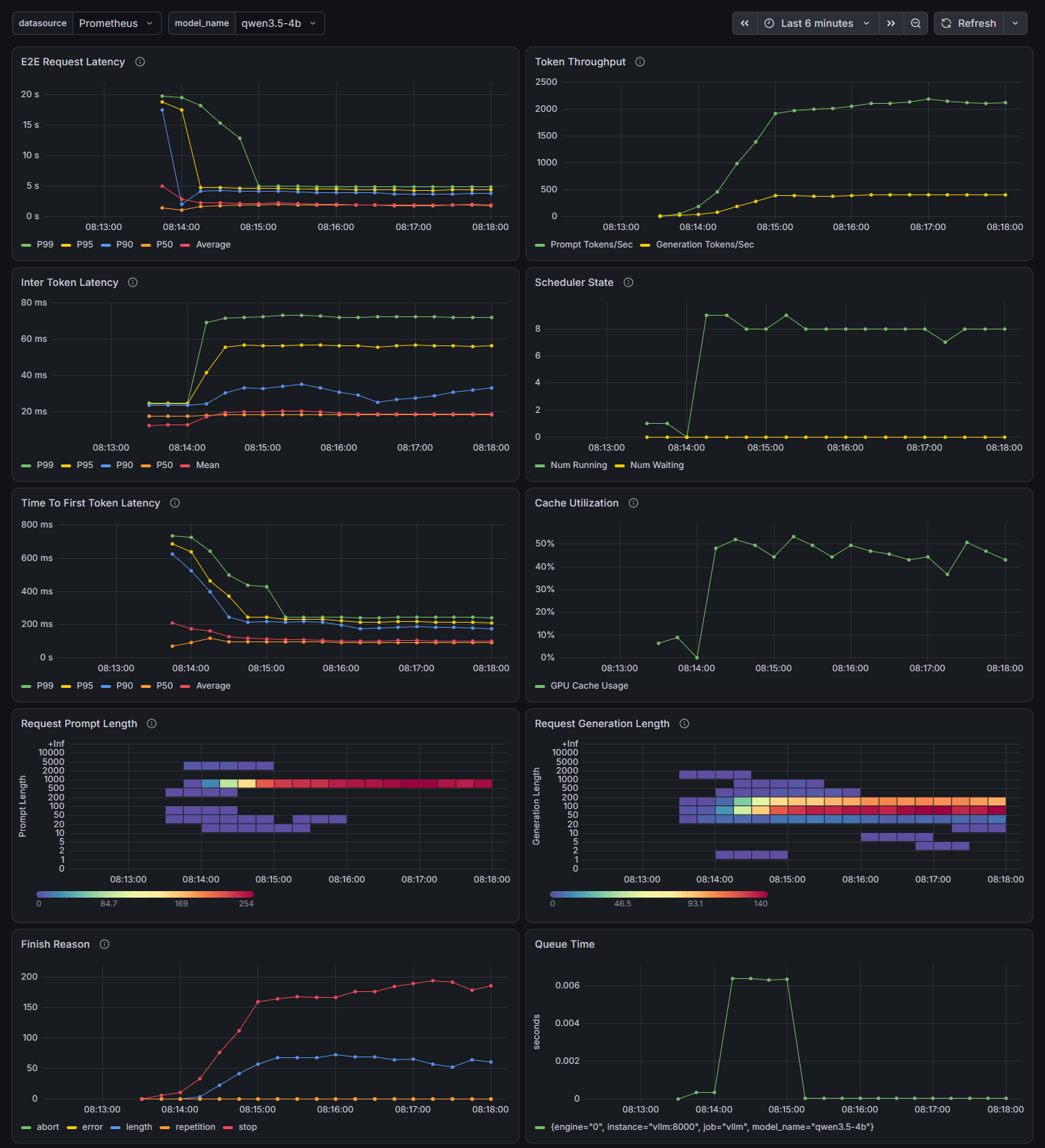
On the charts: eight requests are running, no queue; about 400 output tokens per second; the first token comes after 0.1 seconds on average; the conversation memory is half full.
The log. Every ten seconds there is a line with totals:
Engine 000: Avg prompt throughput: 1913.3 tokens/s, Avg generation throughput: 371.4 tokens/s, Running: 9 reqs, Waiting: 0 reqs, GPU KV cache usage: 49.4%, Prefix cache hit rate: 3.6%| Flag | What it does |
|---|---|
--enable-log-requests | a line for every request: ID and parameters. Texts only at the DEBUG level |
--enable-log-outputs | log the responses too |
--max-log-len | truncate long texts |
--disable-access-log-for-endpoints /health,/metrics | do not log health checks |
--logging-config.formatter json | log in JSON |
A log line in JSON:
{ "asctime": "2026-11-21 06:22:43,840", "levelname": "INFO", "name": "vllm.v1.core.kv_cache_utils", "processName": "EngineCore", "process": 99, "message": "GPU KV cache size: 171,008 tokens, ..."}Tracing. The libraries are already in the image. You need the receiver's address and two variables:
docker run --gpus all --ipc=host -p 8000:8000 --network lab --name vllm \ -v ~/.cache/huggingface:/root/.cache/huggingface \ -v ./vllm:/lab/vllm \ -e VLLM_API_KEY=sk-lab-123 \ -e OTEL_SERVICE_NAME=vllm \ -e OTEL_EXPORTER_OTLP_TRACES_INSECURE=true \ vllm/vllm-openai:v0.34.0 \ --config /lab/vllm/config.yaml \ --otlp-traces-endpoint grpc://jaeger:4317 --enable-log-requestsFor every request vLLM writes one record with ready-made numbers:
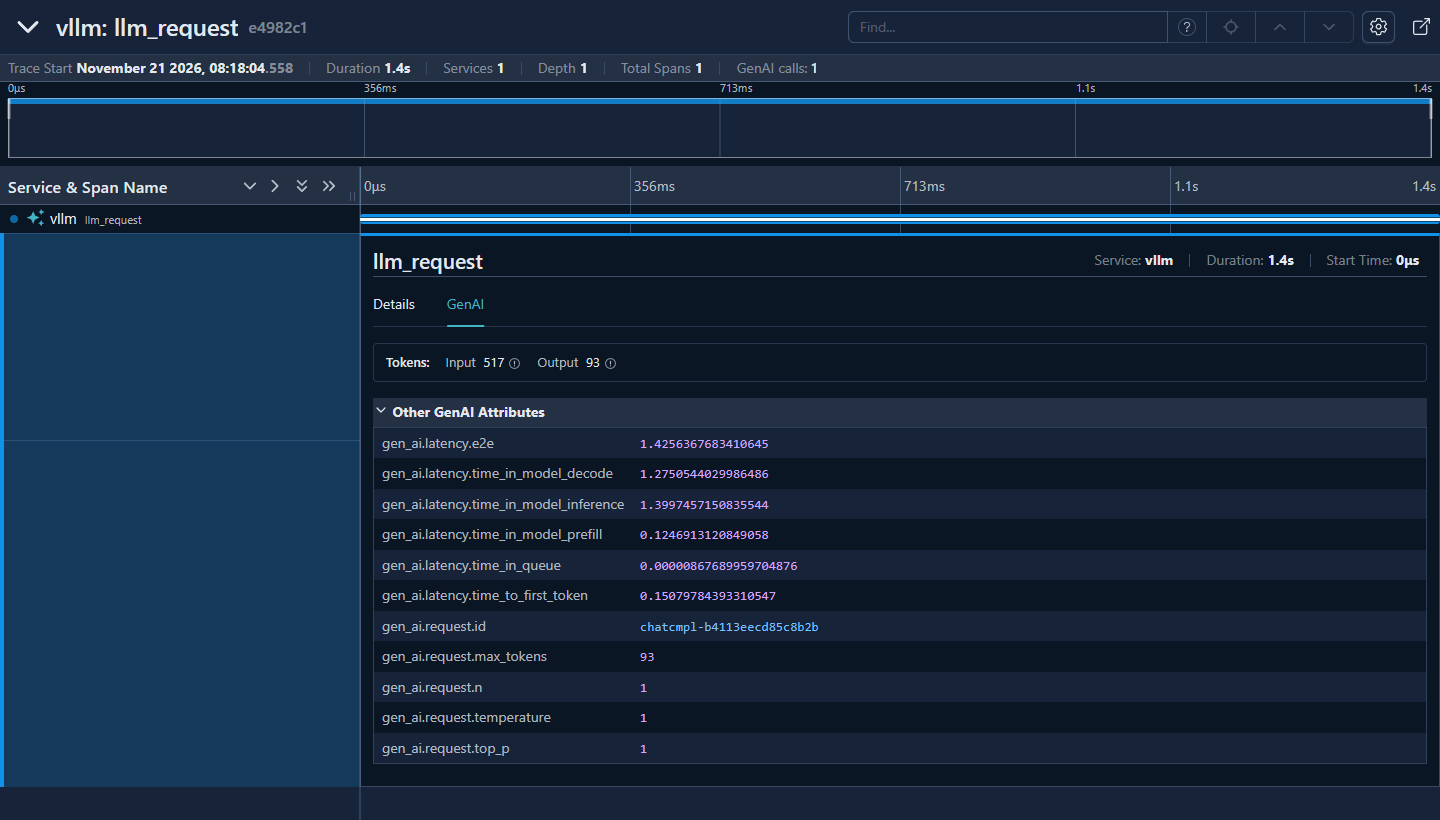
A prompt of 517 tokens was read in 0.12 seconds, an answer of 93 tokens was written in 1.28 seconds, the first token arrived after 0.15 seconds. The field names come from the OpenTelemetry convention for generative AI.
SGLang: metrics, logs, tracing
Metrics are turned on with the --enable-metrics flag.
| Metric | What it shows |
|---|---|
sglang:num_running_reqs | requests running |
sglang:num_queue_reqs | requests in the queue |
sglang:token_usage | how full the conversation memory is |
sglang:mamba_usage | how full the state memory of hybrid models is |
sglang:time_to_first_token_seconds | time to first token |
sglang:inter_token_latency_seconds | pause between tokens |
sglang:e2e_request_latency_seconds | time of the whole request |
sglang:gen_throughput | generation speed, tokens per second |
sglang:cache_hit_rate | share of prompt tokens from the cache |
sglang:num_retracted_requests_total | requests taken off for lack of memory |
The dashboard is in the repository: examples/monitoring/grafana/dashboards/json/sglang-dashboard.json. In version 0.5.23 it shows no data:
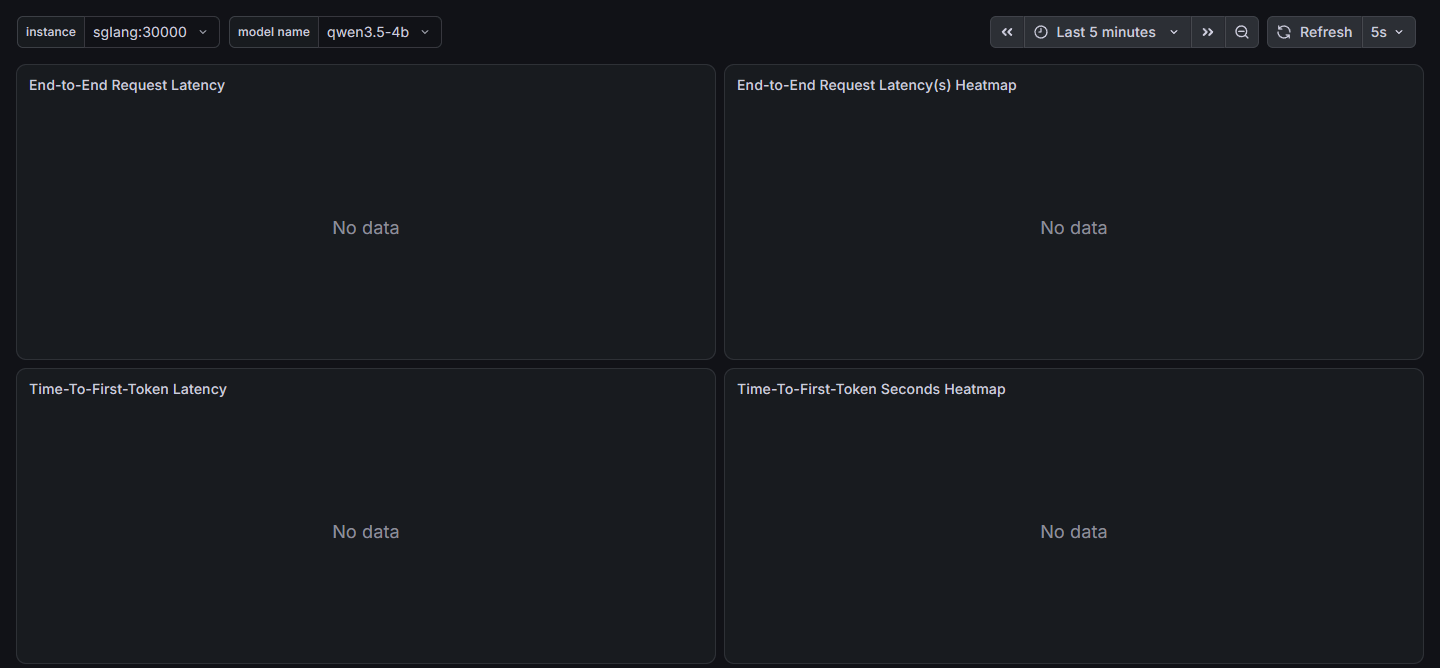
The server publishes metrics with a colon (sglang:num_running_reqs), while the queries in the dashboard are written with an underscore (sglang_num_running_reqs). The fix:
sed -i 's/sglang_/sglang:/g' monitoring/dashboards/sglang.json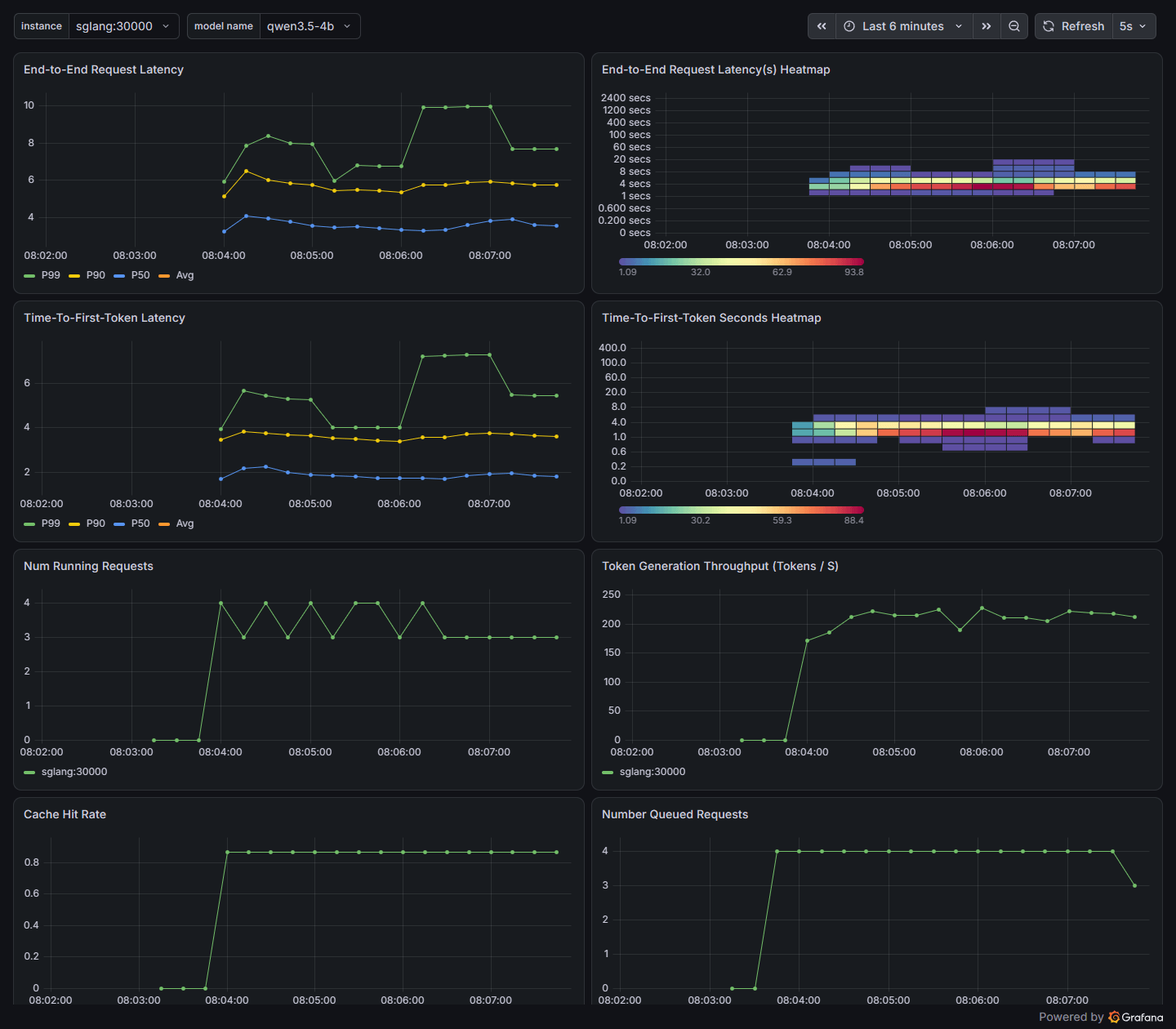
On the charts: four requests are running, four are in the queue — no more fit on this GPU with this model; about 215 tokens per second; the first token after 2–4 seconds because of the queue; a cache hit of 0.87.
The log. A line for every prompt read and once every 40 generation steps:
Prefill batch, #new-seq: 1, #new-token: 69, #cached-token: 448, full token usage: 0.02, mamba usage: 0.80,Decode batch, #running-req: 4, #full token: 1011, full token usage: 0.03, mamba num: 16, mamba usage: 0.80, gen throughput (token/s): 217.87, #queue-req: 4The conversation memory is almost empty (full token usage: 0.03), the state memory is 80% full (mamba usage: 0.80). It is the bottleneck.
| Flag | What it does |
|---|---|
--log-requests | log every request |
--log-requests-level | verbosity from 0 (metadata) to 3 (full texts) |
--log-requests-format json | request records in JSON |
--log-requests-target | where to write: console, a folder or both |
--log-level, --log-level-http | verbosity of the server log and of HTTP |
A request record in JSON, shortened:
{ "timestamp": "2026-11-21T06:09:40.003283", "event": "request.finished", "rid": "369fb465a2ce4d5294e441b2e8fdba7f", "obj": { "sampling_params": {"temperature": 1.0, "max_new_tokens": 120, "top_p": 1.0}, "stream": true }}Only request records are written in JSON. The rest of the log is text; for JSON you need your own log configuration file (SGLANG_LOGGING_CONFIG_PATH).
Tracing:
docker run --gpus all --ipc=host --shm-size 16g -p 30000:30000 --network lab --name sglang \ -v ~/.cache/huggingface:/root/.cache/huggingface \ -v ./sglang:/lab/sglang \ lmsysorg/sglang:v0.5.23-runtime \ sglang serve RedHatAI/Qwen3.5-4B-FP8-dynamic \ --config /lab/sglang/config.yaml --api-key sk-lab-123 \ --enable-trace --otlp-traces-endpoint jaeger:4317 \ --log-requests --log-requests-level 1 --log-requests-format jsonSGLang writes a tree of steps:
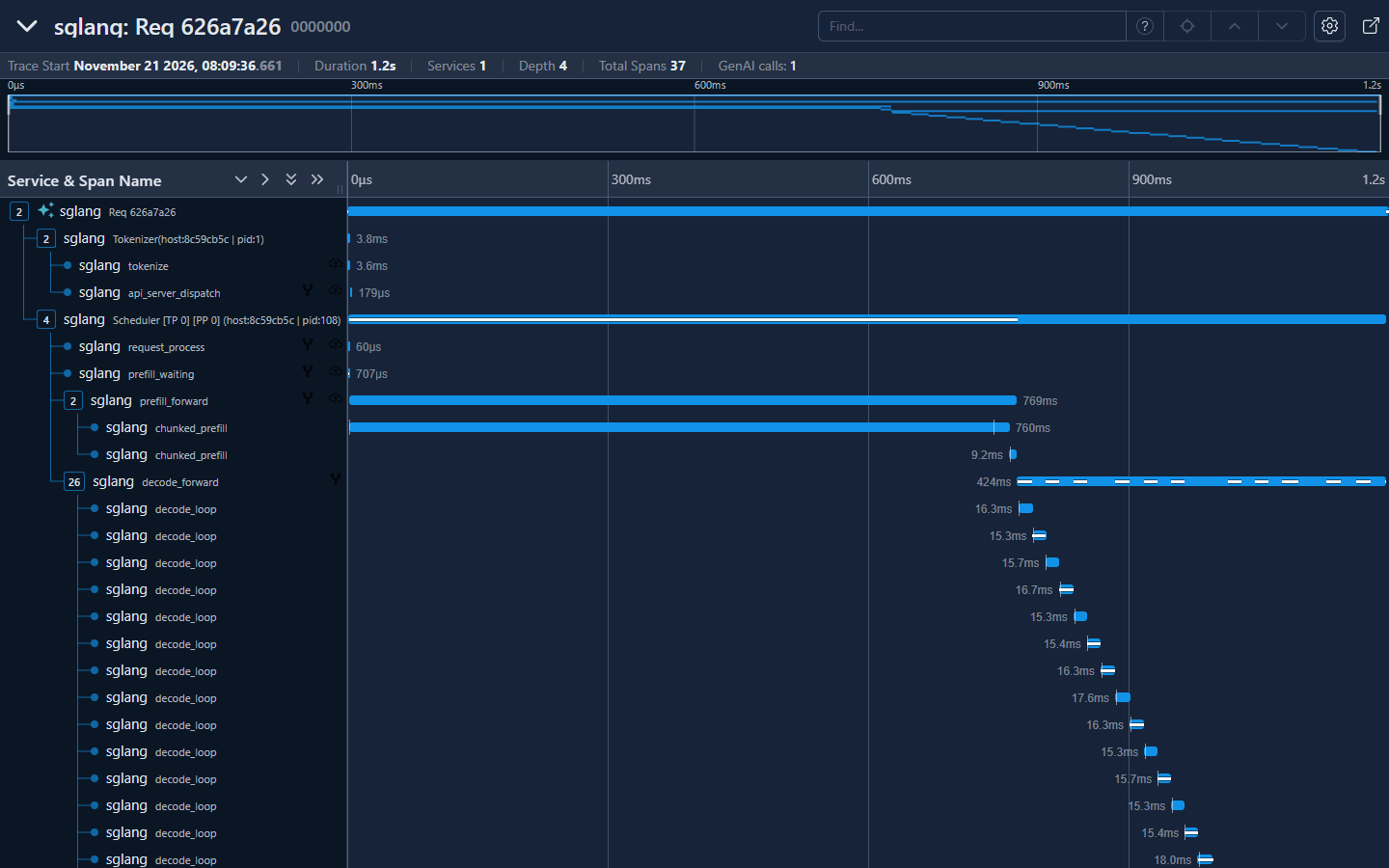
Tokenization takes 3.6 ms, reading a prompt of 2157 tokens takes 769 ms, then generation in batches of 16 ms.
The vLLM record is lighter: one event per request. The SGLang tree is more detailed, but it is dozens of records per request; the detail is reduced with the SGLANG_TRACE_LEVEL variable.
Health checks
| vLLM | SGLang | |
|---|---|---|
| The process is alive | /health: 200 or 503 | /health |
| The server actually generates | — | /health_generate: generates one token |
| Ready to accept requests | — | /ready: 503 during startup, pause and shutdown |
While the model is loading, the vLLM port is closed. In Kubernetes you need a startup probe (startupProbe) with a margin of several minutes, otherwise the pod will restart endlessly.
Performance
There is no general answer to "which is faster". Independent 2026 measurements disagree:
- Winder.AI, September, H100, Qwen3.8-27B: SGLang ahead by 7%.
- Jarvislabs, May, H100, Qwen models of earlier generations: vLLM ahead.
- Which public tests to trust — in the section on benchmarks.
The measurement on the test bench:
- Model: Qwen3.5-2B uncompressed.
- Client:
vllm bench servefor both servers. The prompt is 512 random tokens, the answer is 256 tokens. New prompts on every level. - vLLM:
--max-model-len 8192 --max-num-seqs 64. - SGLang: with default settings and tuned.
docker run --rm --network lab --gpus all --entrypoint vllm \ -v ~/.cache/huggingface:/root/.cache/huggingface \ vllm/vllm-openai:v0.34.0 bench serve \ --backend openai --base-url http://vllm:8000 --endpoint /v1/completions \ --model qwen3.5-2b --tokenizer Qwen/Qwen3.5-2B \ --dataset-name random --random-input-len 512 --random-output-len 256 \ --num-prompts 96 --max-concurrency 16 --ignore-eos --seed 42185Generation speed, tokens per second:
| Simultaneous requests | vLLM | SGLang default | SGLang tuned |
|---|---|---|---|
| 1 | 110 | 109 | 107 |
| 4 | 468 | 454 | 416 |
| 16 | 1382 | 753 | 1150 |
| 32 | 1756 | 783 | 1427 |
| 64 | 2415 | 756 | 1518 |
Median time to first token, milliseconds:
| Simultaneous requests | vLLM | SGLang default | SGLang tuned |
|---|---|---|---|
| 1 | 43 | 45 | 46 |
| 4 | 134 | 154 | 157 |
| 16 | 293 | 400 | 361 |
| 32 | 306 | 7796 | 698 |
| 64 | 330 | 16,667 | 5529 |
Conclusions:
- For a single user the servers are equal.
- Batching works in both. 64 simultaneous requests give vLLM 22 times more text than one.
- SGLang by default limited itself to 12 requests: little memory for the state of the hybrid model. The other requests waited in the queue.
- After tuning SGLang is twice as fast (29 simultaneous requests), but it did not catch up with vLLM.
The tuned SGLang:
sglang serve Qwen/Qwen3.5-2B --host 0.0.0.0 \ --served-model-name qwen3.5-2b --context-length 8192 --enable-metrics \ --max-running-requests 64 --mamba-full-memory-ratio 4 \ --cuda-graph-max-bs-decode 64 --mem-fraction-static 0.72Requests with a shared beginning: four beginnings of 3000 tokens each, 24 requests per beginning, eight at a time.
docker run --rm --network lab --gpus all --entrypoint vllm \ -v ~/.cache/huggingface:/root/.cache/huggingface \ vllm/vllm-openai:v0.34.0 bench serve \ --backend openai --base-url http://vllm:8000 --endpoint /v1/completions \ --model qwen3.5-2b --tokenizer Qwen/Qwen3.5-2B \ --dataset-name prefix_repetition \ --prefix-repetition-num-prefixes 4 --prefix-repetition-prefix-len 3000 \ --prefix-repetition-suffix-len 200 --prefix-repetition-output-len 100 \ --num-prompts 96 --max-concurrency 8 --ignore-eos --seed 43995| vLLM | SGLang | |
|---|---|---|
| Generation speed, tokens per second | 689 | 653 |
| Median time to first token | 141 ms | 172 ms |
| Prompt tokens from cache | 86% | 92% |
On a long shared beginning the servers are equal. The difference shows on short matches and in a conversation that grows bit by bit (the section on sessions).
Limits of the measurement:
- A laptop. On a server card with 80 GB the state memory will not be the bottleneck.
- A hybrid model. SGLang's lag is related to how it lays out the model's state. On ordinary models it can be the other way round.
- Memory at the limit. The tuned SGLang took 11.3 of 12 GB.
- Random prompts are the worst case for a cache.
Measure both servers on your own model, your own GPU and your own load.
vLLM: what to tune for speed
| Setting | Effect |
|---|---|
--max-num-seqs | ceiling of simultaneous requests. Higher — higher total speed, longer pause between tokens for each user |
--max-num-batched-tokens | tokens per step. Lower — smoother pauses, higher — faster first token |
--performance-mode | ready-made sets: balanced, interactivity, throughput |
-O0 … -O3 | optimization level. -O0 — fast startup and slow work |
--spec-method, --spec-model, --spec-tokens | speculative decoding |
the /root/.cache/vllm volume | compilation cache; without it every new container compiles again |
VLLM_WSL2_ENABLE_PIN_MEMORY=1 | under WSL2 about 12% of generation speed, from a measurement in the project discussions. Not checked on the test bench |
SGLang: what to tune for speed
| Setting | Effect |
|---|---|
--max-running-requests | ceiling of simultaneous requests |
--cuda-graph-max-bs-decode | the largest batch a graph is recorded for. On cards under 20 GB — 8; above this the server runs without a graph and slower |
--schedule-policy | queue order. fcfs — by arrival time, lpm — first the one with the longest match in the cache |
--schedule-conservativeness | caution in accepting requests. Below 1 — bolder |
--chunked-prefill-size | size of the chunks a prompt is read in |
--mamba-full-memory-ratio, --max-mamba-cache-size | memory for the state of hybrid models |
--speculative-algorithm | speculative decoding |
SGLANG_CACHE_DIR and a volume | cache of compiled kernels |
A rule from the documentation: the conversation memory is less than 90% full and the queue is not empty — lower --schedule-conservativeness.
Multiple GPUs
This section is written from the documentation, without being run. The ways to spread a model across cards are described in the section on scaling; here are the flags.
| Method | vLLM | SGLang |
|---|---|---|
| Layers split across cards (TP) | --tensor-parallel-size | --tp-size |
| Layers in turn on different cards (PP) | --pipeline-parallel-size | --pp-size |
| Copies of the model (DP) | --data-parallel-size | --dp-size |
| MoE experts across cards (EP) | --enable-expert-parallel | --ep-size |
vLLM: multiple GPUs
Four cards in one server:
vllm serve <model> --tensor-parallel-size 4Two servers with eight cards each, the main node and the second one:
vllm serve <model> --tensor-parallel-size 8 --pipeline-parallel-size 2 \  --nnodes 2 --node-rank 0 --master-addr <main node address>
vllm serve <model> --tensor-parallel-size 8 --pipeline-parallel-size 2 \ --nnodes 2 --node-rank 1 --master-addr <main node address> --headless- Separating prefill and decode onto different servers exists, but is marked experimental. It evens out latencies rather than raising total speed. In production it is done through llm-d, Dynamo or AIBrix.
- Offloading conversation memory to RAM:
--kv-offloading-size. - Autoscaling in Kubernetes — by the
vllm:num_requests_waitingmetric. CPU load tells you nothing here.
SGLang: multiple GPUs
Four cards in one server:
sglang serve <model> --tp-size 4Two servers with four cards each:
sglang serve <model> --tp-size 4 --nnodes 2 --node-rank 0 \  --dist-init-addr <first node address>:50000
sglang serve <model> --tp-size 4 --nnodes 2 --node-rank 1 \ --dist-init-addr <first node address>:50000- Separating prefill and decode is SGLang's strong side: servers with
--disaggregation-mode prefilland--disaggregation-mode decode, with a router in front of them using--pd-disaggregation. - The multi-level HiCache cache: conversation memory is offloaded to RAM and to disk.
- Large models with experts:
--attn-dp-size.
Updates
Both programs are released every two weeks, and every version renames or removes something.
- Pin the image version.
- Read the breaking changes section in the release notes.
- Test the update on a copy with the same model.
vLLM: updates
| Version | What broke |
|---|---|
| 0.34 | conversation memory is counted in a new way; cache block of 64 tokens instead of 16 |
| 0.33 | CUDA 12 builds and two speculative decoding methods removed |
| 0.32 | Python 3.10 removed; requests from other sites in the browser forbidden |
| 0.31 | fp8 compression renamed to fp8_per_tensor |
- The documentation lags behind. In 0.34 the installation page names CUDA 12.9 as the default build, although the packages are built for 13.0. Trust
vllm serve --help=all. - Check function calls on your own data. At the hosting provider Ubicloud they matched the schema in 92% of cases, until strict checking was turned on at the server (write-up).
SGLang: updates
| Version | What broke |
|---|---|
| 0.5.23 | the router moved, its flags were renamed |
| 0.5.22 | Python 3.11 required; --enable-dp-attention replaced by --attn-dp-size |
| 0.5.21 | several API addresses removed; a chat template from the request is rejected |
| 0.5.20 | CUDA 12 builds and 17 flags removed; the Responses API store turned off |
- Deprecated things are removed after two releases, that is, after a month.
- Install security updates. From 27 August to 9 September 2026 a Cloudflare service running on SGLang returned other customers' data in 155 responses: an SGLang bug in the phase-separation mode plus a wrong memory configuration at Cloudflare (write-up). Fixed in 0.5.20–0.5.22.
- Version 1.0 was announced in November 2026, but has not been released yet.
Common errors
| What happens | Cause | What to do |
|---|---|---|
| The server does not start although the model is smaller than the GPU memory | besides the weights, 3–4 GiB are needed | a smaller or compressed model; the section on GPU memory |
| Reasoning arrives instead of the answer | the reasoning parser is not set | --reasoning-parser |
| A function call arrives as text | the tool call parser is not set | --tool-call-parser |
| SGLang in a container does not answer from outside | listens on 127.0.0.1 | --host 0.0.0.0 |
SGLang: --model-path is required | the model is given only in the config file | the model on the command line |
SGLang: state cache is too small | the default memory share is too small | --mem-fraction-static 0.8 |
vLLM: max_num_seqs exceeds available Mamba cache blocks | too many simultaneous requests for a hybrid model | lower --max-num-seqs |
| The SGLang dashboard is empty | the queries have sglang_ instead of sglang: | replace the metric names |
| vLLM answers without a key | /invocations is not protected by the key | a proxy with a list of addresses |
| An SGLang client sees the server key | /get_server_info gives out the settings | --admin-api-key |
| A shared system prompt is not cached in vLLM | it is shorter than a cache block | for hybrid models — a prompt longer than 576 tokens |
| The answer through nginx arrives in one piece | the proxy buffers | proxy_buffering off |
What to choose
| vLLM 0.34 | SGLang 0.5.23 | |
|---|---|---|
| Built by | PyTorch Foundation, Inferact | LMSYS, RadixArk |
| License | Apache 2.0 | Apache 2.0 |
| Models and hardware | the widest choice | slightly narrower |
| Startup on the test bench | 155 seconds | 85–100 seconds |
| Failure on lack of memory | after 2–4 minutes | after 20–30 seconds |
| Memory | measures and allocates by itself | you set the share |
| Config file | everything, including the model | everything except the model |
| API | OpenAI, Anthropic | OpenAI, Anthropic, Ollama, its own |
| Prefix cache | by blocks | a tree, more precise on short matches |
| State on the server | no | sessions in the native API |
| Open without a key | checks, metrics, documentation, /invocations | checks and metrics |
| Metrics | always on | turned on by a flag |
| Ready-made dashboard | works | the metric names need fixing |
| Tracing | one record per request | a tree of steps |
| Telemetry to the developers | yes, can be turned off | no |
| Router | a separate package | in the image; three projects |
| Speed, one request | the same | the same |
| Speed, 64 requests | 2415 tok/s | 1518 tok/s after tuning |
- vLLM is the default choice: more often works without tuning, more models and hardware, all the surrounding tooling supports it first.
- SGLang is for agents and long conversations with shared beginnings, for sessions on the server and phase separation on a large cluster. It requires memory tuning.
- Both are worth measuring if the service is large. Client code does not depend on the choice; the launch command, the config file and the dashboard change.
- Neither, if there is one user: llama.cpp is simpler. With a small or uneven load a cloud API is cheaper.